
Multiple exposure feature lets you combine two or more exposures into one image without using any post processing tool. This option is only available in P, S, A and M exposure mode. Sometimes it’s good to play with camera settings and do an experimental shooting. And, if you are planning for something fun, trying a multiple exposure is a good option. Nikon offers a feature called "Multiple Exposure" which combines two or more images using the RAW data from the sensor, producing images that are blended together smoothly. Here is a step by step camera setup guide if you are interested to try this on your camera.
Camera settings for Multiple Exposure

Multiple Exposure Menu on Nikon D90
1. Go to the Shooting menu by pressing the Menu button on the back of your camera.
2. Choose “Multiple Exposure” from the Shooting menu.
3. Select the “Number of shots” you want to combine into a single frame. Nikon D90 allows you to select up to 3 shots.

4. Choose Auto Gain and select either ON or OFF. When ON is selected, Nikon D90 will divide the total exposure of the image by number of shots specified. For example if you specified number of shots 2 and Gain is ON, each shot will get ½ of the total exposure. If Gain is OFF, total exposure is applied to an individual shot.
5. Press OK to set the Gain.
6. After you are done with the setting, scroll up to the Done and hit OK. Upon completion, you will see the Multiple Exposure icon (overlapping rectangle) on the LCD screen and you are ready for the shot.
7. When you take the first shot, Multiple Exposure icon on the LCD screen starts blinking until you finished shooting all the series (no of shots you specified). If you are in a continuous shooting mode, all the series will be shot in a single burst shot. When you have taken all the series, blinking icon disappears and camera will turn off the Multiple Exposure feature automatically.
Here are the couple of shots I took today as an experiment. I set the number of shots 2 and shot couple of pictures with the Gain OFF and again took another set with the Gain ON. I took all of the pictures with the same exposure settings and didn’t use a tripod, which is why you can see a little overlapping between two frames when they were combined to a single shot. When you take two shots, camera will process itself and combine them into a single shot giving you the Multiple Exposure effects in a single image. I have seen people being experimental and create ghost effects using this technique.
Gain ON

Multiple Exposure Gain On
Focal length : 24mm Exposure : f/3.8 Shutter Speed : 1/60sec ISO : 800
Gain OFF
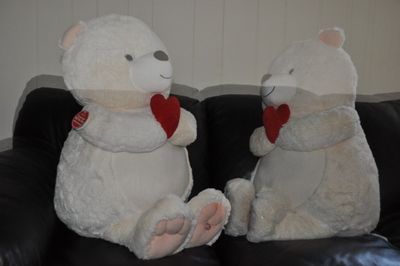
Multiple Exposure Gain Off
Focal length : 22mm Exposure : f/3.8 Shutter Speed : 1/60sec ISO : 800
In both situations, I used only one teddy bear to get the final image. What I did is, first I put the teddy bear on the left side and took a shot. Then, I put the same teddy bear on the right side and adjust a frame, so that both can fit into a single frame after camera combines two images into one, and took the second shot. After camera combined both shots, this is the result I got. It's not a perfect shot and also because of the handheld shooting, pictures didn’t get align properly. But, you can create amazing effects using this technique if applied properly. Nice thing about this feature is that you don't have to use any software to get the effect, your camera will do it for you automatically.