
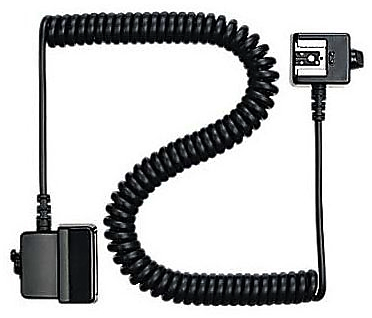
There are two ways to control the remote flash units from your camera. One is using wired connection (using Nikon 4765 SC-28 for example) between the camera and the flash units and other one is wireless method to communicate between the camera and the flash unit. With the increase popularity of wireless technology, wired technology are rarely used these days. Also, wired technology is limited with the distance if you want to experiment with the distance and the angle of the flash units. In addition to that we have got lots of choices with wireless technology and can choose one of the many options available in the market. You just have to decide what you want to do and what you want to achieve and get the kind of device that works best for you. In today's post, we are going to talk about two wireless technologies which are dominantly popular and they are Nikon CLS (Creative Lighting System) and PocketWizard. Let's discuss what are the benefits of using one to another.
Nikon CLS Vs PocketWizard
There are some photographers who think CLS Vs PocketWizard is like Nikon Vs Cannon debate and they have their own arguments about these two devices. I am not thinking of taking side of any technology or equipment and will try to describe these technologies by doing simple comparison with different perspectives and it’s up to you to decide which technology works best for you.

Nikon SB-800
1. Equipment cost
As of today, if you want to buy the complete set (FlexTT5, MiniTT1 and 804-709 AC3 Zone Controller) of PocketWizard to seamlessly control your flash units remotely, it costs around $497.00 on Amazon. And if you want to buy the Nikon flash units with CLS technology, SB-600 costs you around $320.00 and SB-900 costs you around $499.00. You do not have to buy a transmitter for SB-600 or SB-900 to work if your camera has a commander mode. Your camera's built-in flash can act as a transmitter when it is set to commander mode.
That means you will be spending extra money on PW if you already have the camera capable of controlling the CLS flash units remotely. But that investment worth every penny if you need an extra feature like extra distance range between the flash units and the camera or working in various angles which we will discuss next.

PocketWizard
2. Working Range
If you plan not to put your flash units farther than 30 feet from your camera (adjusting angle to reach an infrared signal from the camera), it would be a wise decision not to invest money on PW. But if you are planning to play with different angle of lights and place the flash units farther than 30 feet, PW is the way to go. It gives solid control over the great distance. When used as a transmitter, the FlexTT5 can provide TTL auto flash at distances of up to 800 feet and conventional triggering up to 1200 feet with the aid of a flip-up antenna.
3. Control
Nikon CLS system has a limitation of distance but you can control the remote flash units from the camera whereas today’s PW can go up to 800 feet and works great with an auto FP high speed sync and iTTL mode. Nikon CLS systems are an infrared system and that is the reason many photographers argue that it doesn’t work if the unit falls into the direct sun light. Nikon CLS system works great if the distance and the working angle matches with the camera (line-of-sight) from where it transmits an infrared signal to the remote flash units. But PW works on radio signal and can reach up to 1600 feet.
Nikon CLS systems and PW both work great in an auto FP high speed sync mode and supports iTTL mode. So it is just a matter of the distance and the working angle whether you want to use the CLS technology or buy the PW system.
4. Compatibility
Nikon CLS system only works with the Nikon’s compatible flash units whereas PW works with any kind of system. If you have any flash units other than the Nikon, you can use PW to communicate between your Nikon body and the third party flash unit. All you have to do is, slide MiniTT1 into the hot shoe of the camera and slide your flash units into the hot shoe of FlexTT5. It is very reliable piece of technology and works great.
Note: Nikon CLS is not a device but technology built inside Nikon's advanced flash units like SB-600, SB-700, SB-800 and SB-900 which is used to communicate between the Nikon camera and the flash units.

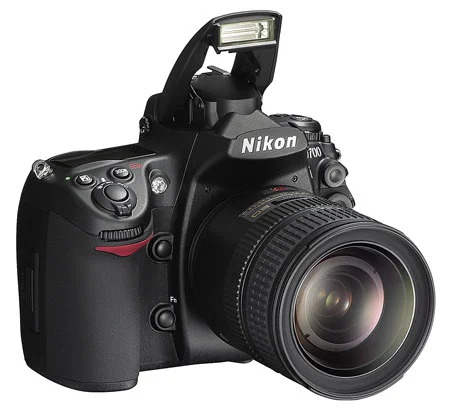






Almost all consumer level DSLRs and some of the pro level DSLRs come with the built-in flash. Professional photographers who shoot wedding, fashion, commercial portrait, or other special events do not rely on built-in flash to illuminate their subject. But, you don't have to use flash only when there is not sufficient natural light. It can also be used as a fill light to remove shadows or to add a catch light to the subject's eye. One of the best thing about the built-in flash is, you don't have to carry around an extra equipment and is always available on your camera, as long as the camera has sufficient battery power to charge and fire the flash. It can be put to use instantly whenever you want and doesn’t require any sophisticated setup. However, you need to understand few basics settings of your camera and should be comfortable navigating through the menu settings and the buttons on the camera.
Use of camera's built-in flash and its effect on the picture is determined by various settings on the camera, but most importantly, which metering mode you are currently using and what exposure mode you are on play a bigger role. Let's recap these camera metering modes briefly and then we can discuss about the steps we would be following in order to use on-camera flash. Since I wrote the blog about camera metering (in more detail) almost 9 years ago, Nikon has added a new metering mode; Highlight-Weighted Metering, which we will be discussing in the section below.