Release mode allows you to choose how you want to release the shutter of your camera. D7000 lets you choose from Single frame, Continuous mode, Self-timer mode, Remote control mode, Quiet mode and the vibration-damping Mirror Up mode.

D7000 Release Mode
D7000 also comes with the release mode dial lock which prevents from changing modes accidentally. When you want to change the release mode, all you have to do is press the release mode dial lock release button on the left side of release mode dial (at the top-left edge of the camera) and rotate the release mode where you want to set to. Let’s get into the release modes that are available in Nikon D7000 and talk about them briefly.
1. Single frame: In a single shot (S) mode, the D7000 takes one picture each time you press the shutter release button all the way down. If you are shooting in Autofocus mode, your subject should be properly focused before you press the shutter release button all the way down otherwise it won’t click the picture. All the camera comes with the default setting to release the shutter only when the subject is properly focused (you can change this setting to give the shutter release a priority without getting subject in focus but why would someone do that, right?)
2. Continuous low speed (CL): This mode allows you to shoot bursts of 1 to 5 frames per second. This frame rate can be set in Custom Settings Menu #d6.
3. Continuous high speed (CH): You can shoot at up to 6 fps in this mode. While taking pictures in this mode, frame rate can slow down if camera’s memory buffer fills. This can force the camera to wait until some of the pictures which you have already taken are written to the memory card, freeing up more space in the buffer. Shutter speed slower than 1/250th second can also decrease the frame rate.
4. Quiet shutter release: When you switched D7000’s release mode to quiet mode indicated by letter Q, it silences the camera’s beep noise, reduces the mirror sound it makes when it flips back down, and delays that “noise” until you release the shutter button.
5. Self-timer: Self-timer mode can be used to delay the shutter release by few seconds once the shutter release button is pressed. This feature can also be used as an alternative of remote release to reduce the camera shake while taking long exposure photographs using tripod. You can specify the delay of 2 sec, 5 sec, 10 sec or 20 sec by navigating through CSM #c3. You can also set the number of shots taken and the interval between each shot.
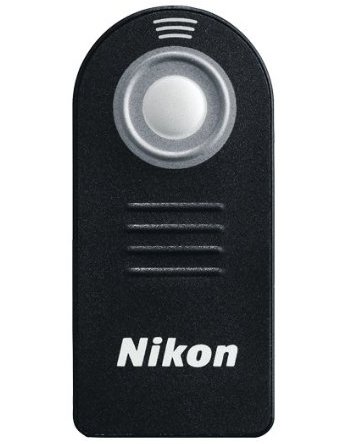
6. Remote control: Remote control release mode can only be used when you want to use the Nikon Wireless remote control, ML-L3, to remotely control the shutter release button. You don’t have to use this mode when using Nikon MC-DC2 wired cable for the shutter release. The remote control can be used in three modes: Delayed Remote (shutter releases two seconds after you press the button on the ML-L3 IR remote); Quick Response Remote (the shutter trips immediately when the button is pressed); and Remote Mirror Up (press once to flip up the mirror, and the second time to release the shutter).
7. Mirror Up (Mup): When this mode is selected, pressing the shutter release button all the way down once lifts the mirror and pressing it again takes the picture and returns the mirror to it’s down position.

If you want to take long exposure shots, there are few requirements in terms of accessories you might need and the camera settings you need to setup. And if you are just starting, you can start with a minimal setup and as you grow more with your experience, you would find out what else you might need to improve your skill. This is what I would suggest to anyone who is starting into any genre of photography; start with the basics, you would make mistakes, learn from those mistakes and keep practicing. This is coming from my personal experience.
Now, to answer your question about the requirements for the long exposure shots, let's talk about the accessories you might need in the first section and then I will go through the camera settings in the following section.
1. Accessories you would need for the Long Exposure shots
- Tripod
Tripod is a must have device when you are taking long exposure shots. The general rule of thumb is: if you are shooting with a shutter speed that is slower than the focal length value, you would need a tripod to get the sharper image. Let’s say you are shooting at the focal length of 80mm, any shutter speed that is less than 1/80th of a second requires a tripod to produce a crisp image. I think it pays to invest in a good tripod (carbon fiber if you can afford) so that you won't have to keep replacing the tripod with every new camera you would buy in the future. I suggest you to get the one that can support heaviest camera-lens combo in the market and have extra features like panning support and easy movement of the camera in all possible directions. I think finding the best tripod requires a little bit of research of your own based on your budget and future plannings.