Inverse Square Law In Digital Photography

The title of the blog suggests that it would a math or physics article but please read until the end and I promise that it would be a interesting read once you find its connection with photography. Today’s topic is practically very important if you are dealing with flash light or studio strobe in your day to day photography. So, without wasting any time, let’s get right into it and see how can we apply the law into our photography world.

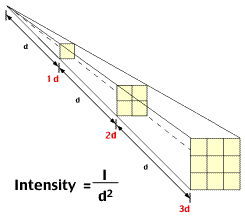
In physics, an Inverse Square Law is defined as "any physical law stating that a specified physical quantity or strength is inversely proportional to the square of the distance from the source of that physical quantity". And mathematically, we can write this law as,

Intensity=1/d2, where d is the distance between the light source and the object.
Inverse Square Law

Inverse Square Law

If you have read the definition carefully, it mentioned “any physical quantity or strength”. That means anything on this earth can be related with this law (for e.g. force, energy, light etc). But today we are going to relate the law with photography, and that means we will talk about the light source and its relation with the distance to the subject. We just looked at the mathematical definition of inverse square law, which shouldn’t scare you even if you are not a mathematical genius. Let me try to decode the formula and explain it in a simple language. Basically, the formula says: the intensity of the light is inversely proportional the distance to the light source, which means the light gets brighter when we are close to the light source and light gets darker and darker as we increase the distance from the light source. I am pretty sure that you would agree with me on this statement and can be related to your daily experience as well, right?

We just discussed the essence of the formula but let’s try to define it again with more precision. And, that is: an object that is two times far from the light source will receive a quarter of the illumination. In photography world, this means, if you move your subject from 1 feet to 2 feet away (double the distance) from the light source, you would need four times as much light to get the same exposure. It’s because according to the Inverse Square Law, light intensity at the 2 feet distance will be 1/4. This extra light can be achieved by changing either Aperture, or Shutter speed, or ISO value by two full stops and compensate the exposure. If you change the aperture, you would need to wide open the lens by two full stops and if you plan to change the Shutter speed, you would need to decrease the shutter speed by two full stops to allow enough ambient light to get the proper exposure. Similarly, you can also change the ISO value by two full stops to get the same exposure.

This light fall-off behavior is pretty interesting if you do more research. As you move the subject far and far from the light source, light fall-off is not that much significant as it is in the beginning. Let’s say you get 100% light in 1 feet distance from the light source, we can form the following table to analyze the behavior of the light with the distance.

Distance Intensity of Light

1 1 (100%)

2 1/4 (25%)

3 1/9 (11%)

4 1/16 (6%)

5 1/25 (4%)

6 1/36 (3%)

7 1/49 (2%)

8 1/64 (2%)

9 1/81 (1%)

10 1/100 (1%)

So when you move the subject from 1 feet to 2 feet from the light source, light intensity will be decreased by 75% but when you move further from 2 feet to 3 feet and 3 feet to 4 feet and so on, light fall off is very minimal and at the end there is no difference at all. It clearly demonstrates the importance of a distance and shows how it affects the behavior of the light. You might find this helpful in the future whenever you are dealing with lights, especially flash lights or studio strobes to illuminate your subject.

What Is Flash Shutter Speed?

This post is a part of our Q&A section. If you want to submit your question, please use the form in the Contact page.

QA.jpg

Dinesh (Mumbai, India) asked : I read your post about flash sync speed and got confused about flash sync speed and flash shutter speed. I went through Nikon D90 manual but couldn’t be satisfied with the explanation they gave. Can you please tell me the difference between flash sync speed and flash shutter speed?

If you already read my post about flash sync speed as you have mentioned in your question, I will skip that part and jump right into your question about what is flash shutter speed and when should we use it?

Flash shutter speed represents the minimum (slowest) shutter speed your camera will use when the flash is set to normal sync mode. Sometimes it’s also referred as a “studio sync” speed. Many photographers especially studio photographers have used sync speed of 1/60th of sec which has become somewhat standard. However, some photographers like to shoot in a different shutter speed. If you would like to eliminate as much ambient light as possible, you should go with the higher value such as 1/200th of sec or 1/250th of sec shutter speed. But if you want to capture ambient light (using rear curtain slow sync), you can start with 1/60th of sec and decrease the speed as you need.

There is no standard or correct sync speed, but if you are shooting under normal light inside studio or outdoor, default flash shutter speed, which is 1/60th of sec can be best choice and then you can manipulate your speed depending upon whether you want to capture the ambient light or avoid it. And if you want to change the default value in your camera settings, it is fairly an easy setup. If you are using Nikon D90, you have to go to CSM (Custom Setting Menu) and go to the Bracketing/flash and choose option e1. But if you are using D200, D300, D700 and other higher D-series like D2 or D3, you have to navigate through CSM and go to option e2.

Auto FP High Speed Sync Mode

Flash photography is a very exciting topic and confusing too at the same time. It offers variety of techniques to produce excellent photographs, but also requires you to learn its technical terms, understand those techniques and apply them properly. Earlier, we discussed about different types of flash sync modes and when should we use them. Today, we are going to discuss about another flash technique/mode, Auto FP High Speed Sync mode. But before jumping right into the topic, let’s discuss about what is the flash sync speed and how does it work?

What is Flash Sync Speed?

Flash sync speed represents the fastest shutter speed any camera can use with a flash. Different camera offers different flash sync speed, and over the time, flash sync speed has been increased significantly due to advancement of technology in digital world. Nikon D90 has a sync speed of 1/200th sec, whereas D7000, D300s and D700 offer 1/250th sec to 1/300th sec. Similarly, Nikon D3X and D3S have a sync speed of 1/250th sec. When you are using a built-in flash unit or an external flash unit, you can’t use a shutter speed faster than the camera’s flash sync speed. It is as simple as that. If you need to use a flash light beyond the flash sync speed, you need to use a feature called Auto FP High-speed sync. This situation may arise when you are shooting in a bright daylight and need to use a flash as a catch light or fill light for the shadows. When you use flash in such condition, you would need to use a shutter speed faster than the flash sync speed to compensate the exposure from the flash light.

After this brief intro to flash sync speed, let’s get into today’s topic, Auto FP High Speed Sync. FP stands for focal plane and it represents the type of shutter used in DSLRs camera. A focal plane shutter is two precisely timed curtains that move vertically between the lens and the camera sensor allowing or disallowing the lights hitting the sensor. The reason to use two precisely timed shutter curtains is to increase the performance of the shutter speed. The shutter speed is determined by the timing between the start of the first curtain opening and the start of the second curtain closing. This is important to understand that the entire sensor will be exposed to the light (the condition where the first curtain completely opens before the second curtain begins to close) for the duration of the shutter speed that matches the flash sync speed, also called maximum normal flash sync speed.

When you are using a faster shutter speed than the normal flash sync speed, the second curtain (also called rear curtain) starts closing before the first curtain (also called front curtain) is completely opened; thus never exposing the entire sensor to the light at any one time. If you keep increasing the shutter speed higher and higher, this will result in a very narrow 'slit' of light that travels across the sensor. And in this case, if there is not enough ambient light, you will get a dark area at the bottom of the picture. This is because when the camera takes a picture, image is recorded upside down on the focal plane, and as the second curtain already started closing before the first curtain completely opens, sensor will not get enough light to brighten the top part of the image which is actually a bottom area of the subject. To overcome this issue, Nikon developed a technique called Auto FP High Speed Sync Mode (not available in all models of DSLR). Auto means camera will automatically use high speed sync whenever it’s needed, or otherwise it will use normal standard sync speed. In a normal flash sync mode, the flash is fired at once with its full power. But in case of FP High speed sync mode, flash is divided into burst of flashes and fires continuously throughout the travel time of small window which travels across the camera sensor. And because of that reason, when you are using very fast shutter speed like 1/8000th sec for example, you will have to consider the power of the flash unit as the flash power is stretched more for narrower slits and it may not be able to brighten the picture or subject area.

Auto-FP-High-Speed-Sync-menu.jpg

Different camera has a different menu option to setup Auto FP High Speed Sync mode. If you are using Nikon D90, you can go to the CSM menu and go into the option e5 to set Auto FP ON, and if you are using D700, you can go to e1 to enable High speed sync mode.

Here is what Nikon says about Auto FP High Speed Sync Mode

Auto FP High Speed Sync is a flash mode used for fill-flash photography under brightly lit conditions. It will fill in and open up shadowed areas in order to portray the greatest detail in subjects. It's also ideal when using wide aperture lenses, and because it allows fast shutter speeds up to fastest shutter speeds on compatible Nikon D-SLRs. It is often used for action-stopping sports photography. And for portraits, you can open up your lenses to their full aperture in order to isolate your subject against a blurred background without overexposing the image.

When Auto FP High Speed Sync is selected, the flash will fire for the duration of the shutter curtain's travel, thus syncing with the camera's shutter speed when that speed is set higher than the camera's normal sync speed.

The loss of a flash power is the trade-off when you are using a flash in a High speed sync mode.