Nikon's Flash Value Lock (FV Lock) Feature

Nikon’s latest DSLR cameras come with the feature to lock exposure settings and other parameters like Autofocus, Focus point area, flash value etc. When the exposure is set for the shot, or when the camera acquires auto focus on the subject, or when we want to lock the flash value, we can use the lock feature to lock those settings so that it won’t change inadvertently during the shooting. We discussed about Auto Exposure Lock (AE-L) previously, and today, we are going to discuss about the Flash Value lock (FV Lock) feature.

The basic idea is common between these two features. Auto Exposure Lock feature is use to lock the exposure value and the Flash Value Lock is use to lock the flash power. This feature comes very handy when we are shooting in camera’s default metering mode, matrix metering mode, in which the camera calculates the exposure and the flash setting by taking the information from the entire frame rather than the subject itself. Let’s say we put the subject in the middle of the frame, lock the focus on the subject and press the shutter release button halfway down to calculate the exposure. Now, if we continue pressing the shutter release button all the way down and take a picture, there would be no issue and the camera would balance the overall exposure of the subject and the background image. But, let’s say, we don’t want to put the subject in the middle of the frame and want to recompose the shot. As soon as we move the camera to recompose, metering system will calculate the new exposure value and the flash setting based on the new information from the frame. If the new composition has more darker area, camera will increase the flash power to compensate for the less available light and it would result into the overexposed subject when we press the shutter release button to take the picture. Now, let’s see how can we solve the problem by locking the flash value.

How can we lock the Flash Value?

To solve this problem, we can program the camera’s function button or even AE-L/AF-L button to activate the Flash Value Lock (FV Lock) feature once the button is pressed. When we program either of these two buttons for the FV Lock, next thing we would have to do is point the camera/flash towards the subject, press the shutter release button half way down which locks the focus on the subject and meters the exposure. We would then lock the flash value by pressing the FV Lock button, which we just programmed. After pressing the FV lock button, camera will fire pre-flashes on the subject briefly and lock the flash power to properly expose the subject in given lighting situation. We would then recompose the shot by moving the subject inside the frame. After the flash value is locked, even if the lighting condition is changed in the frame by recomposing the shot, flash value will not be recalculated by the camera and stays in the previously locked value. When we are ready to take the shot, we will press the shutter release button and the flash will be fired with the power camera previously locked into. This will give the proper exposure to the subject ignoring the ambient light in the background.

Once we lock the flash value, it remains on that power setting unless we press the FV Lock button again, or the camera is turned off, or the light meter in the camera times out. We can increase the light meter timeout period but we have to be careful doing so, because it might drain the camera battery faster if we forget to bring it back to it’s default value after we are done shooting with the locked flash value.

Flash Value Lock.JPG

In this photograph above, there is a mix of color tones and the lights in the background and the foreground. There is a dark table in the background and a white tablecloth in the foreground. She is wearing a dark color dress and he is wearing a white t-shirt. The lighting situation is bit tricky and I wanted to properly expose for the subjects and place them on the side of the frame rather than in the center of the frame (Rule of Thirds). This kind of a situation can confuse the camera light meter and flash may fire with the improper power setting. That is why I locked the flash value on the subject, recomposed the frame and then took the shot.

Normally we should use the FV lock feature to meter the subject that is off-centered and the background is bit darker.


Understanding Nikon's Flash Metering Mode

Metering is the technique, which is used to determine the optimal exposure for the subject and the overall scene based on the information camera gets from available light sources. Nikon uses the flash metering system to determine the flash output when the flash is set to auto (also called TTL or i-TTL) mode, and the camera metering system to determine the overall exposure of the image if the camera is set to A, S or P exposure mode. In manual (M) mode, you would take the reading from the camera metering system as a reference whether it is negative (underexposed) or positive (overexposed) and set the exposure values (Aperture, Shutter speed and ISO) manually to adjust the exposure. Nikon D90 and most of the other Nikon DSLRs support three types of Metering Modes, and they are Matrix Metering, Center-Weighted Metering and Spot Metering, which we discussed in previous blog.

In TTL mode, the built-in flash, as well as the external flash unit attached to the camera, adjusts the flash power to properly expose the scene by using the information from one of these three available metering modes. When the flash is set to TTL mode, choice of the camera metering mode determines whether the flash metering system, which shares the same metering sensor with the camera metering system, should consider the ambient light and balance the overall exposure or ignore the ambient light all together and only count the light from the main subject to determine the flash output power.

What is TTL mode?

Nikon’s latest DSLRs and the flash units use the TTL technique to determine the amount of lights reflecting from the scene and adjust the flash power accordingly. TTL stands for Through The Lens and it refers to the process of gathering information through the lens and passing that information to the metering system in order for the camera to deploy the appropriate flash power. Older camera systems either used manual calculations to determine the flash exposure or used a sensor in the flash itself rather than the metering sensor in the camera. And, i-TTL (intelligent-TTL) refers to the latest TTL flash system from Nikon. In latest Nikon cameras, TTL refers to i-TTL by default and I am using TTL and i-TTL interchangeably in this blog.

There are two types of i-TTL methods used in Nikon’s lighting system and the DSLRs, which are iTTL Balanced Fill-flash and Standard iTTL Fill-flash. Now, let’s talk about these two different TTL methods and discuss how they work differently.

1. iTTL Balanced Fill-flash (i-TTL/BL or TTL/BL)

Nikon's i-TTL (intelligent through-the-lens) Balanced Fill-Flash automatically balances the output of the Nikon Speedlight to match with the scene's ambient light. This flash mode is selected by the camera automatically when the flash is in TTL mode and the camera metering is in either Matrix Metering mode or Center-Weighted Metering mode. If the camera is set to A, S or P exposure mode and the flash is in i-TTL/BL mode, Nikon Speedlight fires the series of pre-flashes to determine the exposure value for the subject by taking the ambient light into account and send that information back to the flash metering system in the camera. The flash metering system then combines that information with the metering information from the camera metering system and the focal length information from the D or G lens to analyze and calculate the final flash output in order to balance the overall exposure. All of this complex processing happens in a fraction of a second, before each exposure, to provide unprecedented levels of flash precision and performance. This is a very powerful and easy to use technology from Nikon and probably one of the best in the industry.

iTTL Balanced Fill-in flash

iTTL Balanced Fill-in flash

In short, using this technology, Nikon DSLR measures the available light and then adjusts the flash output to produce a natural balance between the main subject and the background. It will reduce the harsh shadow as well as the highlights in the subject caused by the over powered flash.

2. Standard i-TTL Fill-flash

This mode is activated when the flash is in TTL mode and the camera metering is in Spot Metering Mode or if you are using the external flash and the flash is set to standard mode. In this mode, the flash output is adjusted only for the main subject in the frame, and the brightness of the background is not factored in while calculating the flash power. If the standard i-TTL Fill-flash is chosen by the camera by dialing the camera metering into the spot metering mode in A, S or P exposure mode, the background light is ignored and the camera will fire the flash to give you the correct exposure for the main subject only. If the overall exposure for the scene and the main subject is properly balanced without using the flash (shooing outside in a bright daylight for example), using the standard i-TTL Fill-flash may overexpose the subject by adding the extra light to already properly exposed main subject. You should use this mode only when the flash is main source of the light for the subject (shooting in a dark room for example) and you want to emphasize the main subject at the expense of the proper exposure for the background.

Standard i-TTL Fill-flash

Standard i-TTL Fill-flash

In this picture above, the exposure on the main subject was metered by the flash metering system by firing the pre-flashes on the main subject and then analyzed the light reflected from the main subject along with other information that camera provided, including the metering mode and the focal length. The flash metering system then adjusted the flash power and fired the flash just to illuminate the main subject. If you notice the background, which is relatively darker, was metered by the camera metering system and exposed by the ambient light only. The flash power was calculated by the flash metering system to expose the main subject only which was weakened by the time it reached to the background, and hence flash didn’t contribute for the background exposure at all.

Nikon D90 Autofocus Area Mode

In my previous blog post, we discussed about different Autofocus Modes available in Nikon D90 and learned how to use them in different situations depending on what kind of subject we are shooting. In this blog, we are going to discuss about “Autofocus Area” which allows us to choose which of the 11 focus points should be used to evaluate and lock the focus. By default, Nikon D90 selects the focus area among available AF points itself, which works perfect most of the time. But if you want to select the focus point yourself, you have to change the default settings on the camera and that is what we are going to discuss next.

Nikon-D90-AF-area-mode.jpg

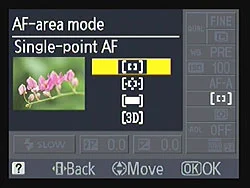
If you press the menu button on the back of the camera and go to the CSM (Custom Settings Menu) menu which looks like pencil icon, the first option you will see is AF-area mode and this is where we will need to change the focus area setting. When you are in the menu, press the AF-area mode and you will be presented with the four options to set the autofocus area mode. Let me explain these different modes in brief so that you can decide which mode to use in your shooting environment.

1. Single point

When this mode is selected, you can choose which one of the 11 focus points should be used to focus the subject and the camera sticks with that focus point. This mode works best for the stationary subjects but will also be helpful when you want to focus on particular one subject among many. One of our readers asked a question: "how to force her D90 to autofocus particular subject" while shooting in a jungle and the Single Point focus mode was the best option for her. Nikon D90 automatically uses this option in a Close-up scene mode. In this mode, you have to select the focus point manually by using the multi-selector button (thump pad) on the back of the camera.

2. Dynamic area

When you select this mode, you can select the focus point but the D90 can use other focus points as well if the subject moves. This mode is the best option for capturing moving subjects.

3. Auto-area

This is default mode for Nikon D90 where camera selects the focus point for you automatically. I use this mode most of the time and works great.

4. 3D-tracking (11 points)

In this mode, you select the focus point using the multi-selector button but if your subject moves, D90 tracks subject in 3D direction and re-frame it as it moves right, left, up, down, forward and back. This mode is the best option for sports photography.