
Use Panning Technique To Shoot Fast Moving Subjects

Panning is the photography technique which is primarily used to show the motion of the fast moving subject. The basic idea behind the panning is to follow the moving subject with the camera as it crosses your field of view, resulting in the subject being sharp and the rest of the shot including the background image blurred. Relatively sharp subject and the blurry background gives the feeling of the movement and the speed. It’s particularly useful in capturing any fast moving subject like racing cars, running animals, cyclist etc. If you want to master the panning technique, first and most importantly, you have to follow few simple rules and then practice with a lot of patience. Do not get frustrated with some blurry subjects initially. Panning is a skill which can be learned over time but you need to experiment with many variables including your camera settings, your distance with the subject, shutter release timing etc., which we will discuss later. In order to get the good result with panning, the ideal flow would be - maintain a balanced distance with the subject, use a little slower shutter speed, follow the moving subject and pan your camera along with the subject on the same plane of the motion, take the shot and continue to pan in the same direction.

Here are few guidelines you can follow to properly apply panning technique.

1. Use the Shutter Priority Mode.

2. Start from a slower shutter speed (1/15s - 1/30s) and go up or down little bit as you need depending on the speed of the subject and the lighting conditions.

3. Shoot in a Continuous Autofocus Mode because your subject and the camera are constantly moving in proportion to each other. This way camera continuously track and focus the moving subject.

4. If your camera doesn't support autofocus, you have to judge the traveling path of the subject, determine the subject's final point for the shooting and pre-focus on that point and then take the shot.

5. Use a Continuous Shooting Mode or a Burst Mode so that you can have a multiple shots and will have the flexibility to choose the best among many shots.

6. Position yourself parallel in front of the moving subject. If you keep larger distance from the subject, it might decrease the speed of the subject in relation with you and your camera, but it also reduces the effect of panning, and the effect is often why we do the panning. So, you have to balance the distance with the subject and the speed of the panning.

7. Place your subject position fixed in your viewfinder and smoothly move your camera as the subject moves on it's track.

8. Continuously follow the track of the moving subject, take the shot and keep moving the camera as if you are taking a shot. This will create a soft transition and gives better result.

9. If you need an extra support for heavy camera and big lens, you can use a tripod which supports panning feature. It gives extra stability to minimize the motion blur on the main subject.

Panning Technique (Image Credit : AdoramaTV)

Panning Technique (Image Credit : AdoramaTV)

Exposure : 1/30 sec     Aperture : f/14.0     Focal Length : 200mm     ISO : 100

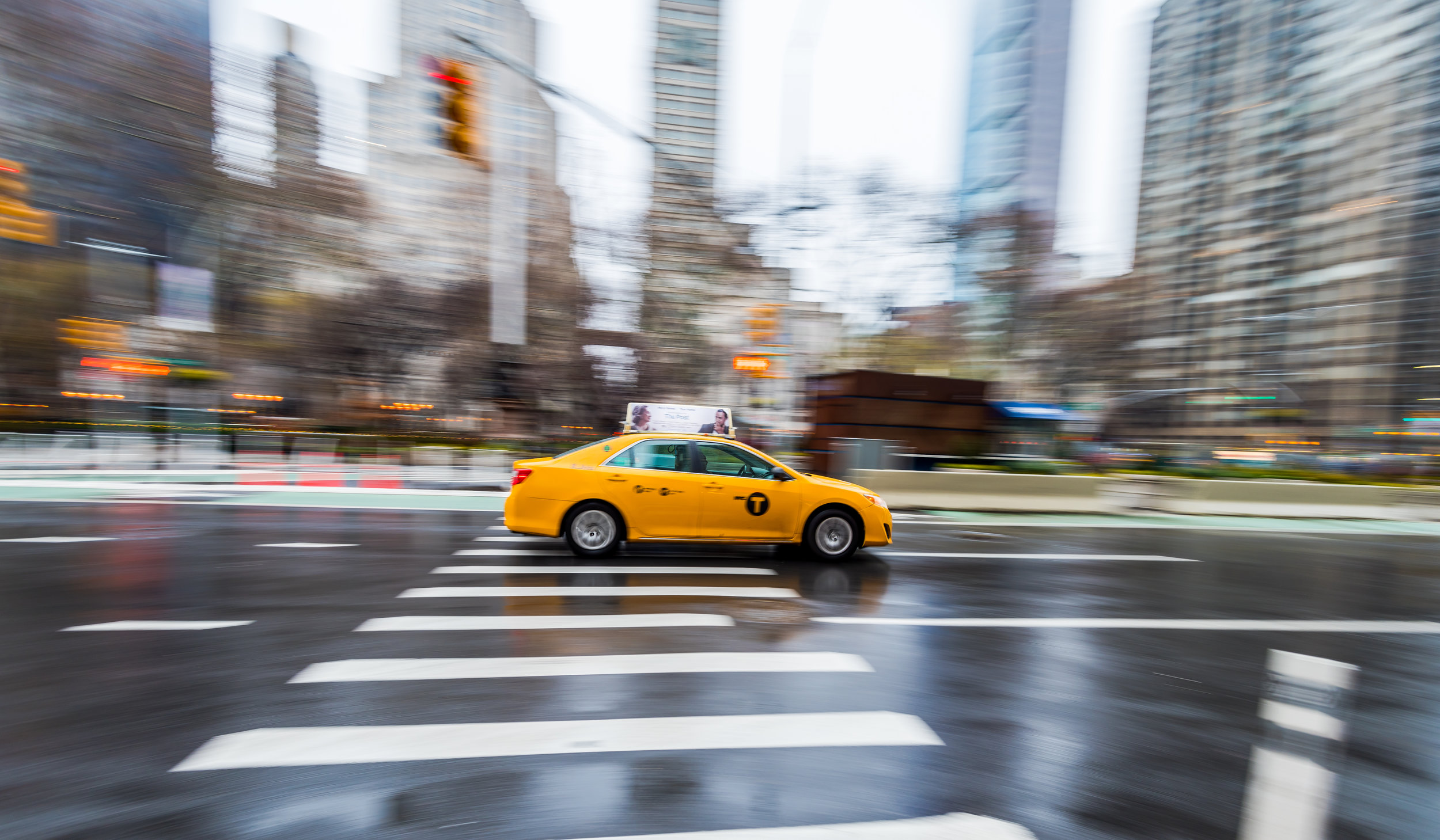
If you are new to this technique, do not expect to get a perfect shot in the beginning. You have to keep experimenting with different settings until you get the best result. Also using this technique, you might not get a super sharp result but panning allows you to shoot the moving subject smoothly and at the same time gives you the feeling of the motion. If you do it right, you will get the subject relatively sharper than the motion blur background, which is the main idea of this technique to give a sense of the moving subject. Here is something I tried during my recent visit to New York City.

New-York-Traffic.jpg

Exposure : 1/15 sec     Aperture : f/22     Focal Length : 16mm     ISO : 200

It's not as perfect as I would like it to be but I will try next time and keep practicing until I get the better result.
Slow Sync Flash Photography

When you are shooting in a low light condition, you have a couple of options to set the exposure correctly. One is to use a slower shutter speed and the other one is to use an external flash unit as a light source. When you use the slower shutter speed, you will be able to collect enough ambient light to get the proper exposure. This technique works very well when you are shooting non-moving subjects such as a statue, trees, buildings, landscape etc. But there is a chance of getting a blurry image when you are shooting moving subjects with the long exposure setting. On the other hand, when you use en external flash unit and let your camera choose an appropriate settings automatically, camera normally sets faster shutter speed because it detects there is a presence of an external flash unit to compensate the exposure. Now, when you shoot with that camera settings, you will get the well exposed subject but you will also get the dark background because the camera sensor didn't get enough time to collect the ambient light from the environment.

An example of slow sync flash

An example of slow sync flash

It's common that the ambient light will be much warmer than the electronic flash lights . If you want the two sources to match, you may want to use a warming filter on the flash. That can be done with a gel if you are using an external flash unit like the SB-600, SB-700, SB-800 or SB-900.

This is the situation where the slow sync flash comes handy. It combines both techniques discussed above and gives the better result. Slow sync flash is the perfect choice for low light photography specially if you are shooting portrait or other moving subjects. This technique is supported by most of the DSLRs which tells your camera to shoot with both slower shutter speed (longer shutter opening time) as well as firing the flash. When you are using slow sync flash, it fires the flash briefly to light the foreground subject and capture the ambient light to reveal more details in the background. With this technique, you will get the properly exposed subject and also be able to collect the ambient light from the environment to get well exposed background scene. If you have noticed "night mode" or "night portrait mode" available in your camera, they use the same technique but will give less control to the photographer. If you need more control over the shutter speed or flash power, you have to use the Manual Mode (M).

An example of slow sync flash

An example of slow sync flash

When we talk about slow sync flash, there are couple of slow sync flash techniques we have to discuss. And they are - front curtain sync flash (also known as the first curtain sync flash) and the rear curtain sync flash (also known as the second curtain sync flash). Both front curtain flash and the rear curtain flash techniques can be used for moving subjects when there is a mix of the ambient light and the flash light to get the motion blur effect.

1. Front Curtain Sync Flash

The standard slow sync mode is the front curtain sync mode. This mode tells the camera to fire the flash at the beginning of the exposure and then keeps the shutter open for the ambient light exposure. That means when you press the shutter release button, the flash fires immediately which freezes the motion of the moving subject and then the shutter will remain open afterward for the duration of the shutter speed and captures the ambient light.

2. Rear Curtain Sync Flash

This mode tells the camera to fire the flash at the end of the exposure. That means when you press the shutter release button, camera opens up the shutter and starts collecting the ambient light and just before closing the shutter, the flash will be fired to light up and freezes the main subject.

Rear Curtain Sync Example (Image Credit : Todd Klassy)

Rear Curtain Sync Example (Image Credit : Todd Klassy)

Rear Curtain Sync Example : When the card was moving from the top left corner to the bottom right corner, rear curtain sync flash gave that nice trailing effects of traveling path while giving a clear and frozen shot of the card at the end.

Both techniques look the same but they both have different effects when properly applied. Usually, you will find sports photographers using the rear curtain sync flash to freeze the player and get the nice motion blur effect behind the player.

Lets take another slow sync flash photography example of "moving car on the road".

Front curtain Flash : When you press the shutter release button, shutter opens up and the flash will be fired immediately which freezes the motion of the car. While the car is continuously moving, shutter will be closed and end the exposure. Because of the less light available at the end of the exposure, there is a less light motion blur in front of the car.

Rear Curtain Flash : When you press the shutter release button, shutter opens up until the exposure time and because of the less available light, you would get a less light motion blur at the beginning. While the car is still moving and at the end of the exposure, flash will be fired which freezes the motion of the car and then the shutter will be closed. In this case, the motion blur is behind the car, as it should be.

If you want to learn more about the flash photography and other available flash modes with more examples, please read my latest blog - “Understanding Flash Sync Modes”.

Manfrotto 055XPROB Pro Tripod And Manfrotto 498RC2 Ball Head

When I bought my first tripod about two years ago, I didn't care too much about the quality. I was rather focused on the price and got fairly priced tripod for around $50. My first DSLR was Nikon D60 which I bought with the kit lens and I was not having problem using that tripod with the D60. But when I upgraded my camera to Nikon D90 with a bigger lens, 18-200mm VR II, I felt the need for a sturdy and strong tripod to hold the camera (and the lens attached to it) without worrying about it falling off the tripod. I have had a bad experience (tripod legs fell apart) with my previous cheap tripod when I was shooting July 4th fireworks in New York city.

Manfrotto 055XPROB Tripod Legs

Manfrotto 055XPROB Tripod Legs

After doing some research and reading online reviews, I bought Manfrotto 055XPROB Pro Tripod with Manfrotto 498RC2 Ball Head. I could go with Manfrotto 190XPROB 3 Section Aluminum Pro Tripod and 498RC2 ball head but I felt like to go one step up just to be safe for the future gears. Manfrotto 055XPROB Pro Tripod shares all the features with Manfrotto 190XPROB 3 Section Aluminum Pro Tripod but the 055XPROB is a more sturdy, heavier and a little taller than the 190XPROB. When you are not doing photography, you can actually use the 055XPROB for the weight lifting purpose as well. I guess little bit of humor doesn't hurt, and in fact, we all need it as a daily dose.

Let me summarize the basic differences between the 055XPROB and the 190XPROB.

Manfrotto 055XPROB Vs Manfrotto 190XPROB

1. Weight Support

055XPROB - Supports up to 15.4 pounds

190XPROB - Supports up to 11 pounds

2. Base Area

055XPROB - Leg diameters 29.4, 25, 20 mm

190XPROB - Leg diameters 25, 20, 16 mm

3. Height

055XPROB - Min/Max. height 3.9"/70.3"

190XPROB - Min/Max. height 3.3"/57.5"

4. Weight

055XPROB - Weighs 5 pounds

190XPROB - Weighs 4 pounds

Both gears are designed with the same basic principles and share common features like extending the center column and fold to make a horizontal arm and both are made out of solid aluminum material.

Manfrotto 498RC2 Ball Head

Manfrotto 498RC2 Ball Head

Manfrotto 498RC2 Ball Head works great with both tripods and gives an extra feature to those photographers who love to shoot panoramic shot using horizontal pan (Manfrotto 496RC2 Ball Head lacks this feature).

This ball head has been totally redesigned for better ease of use. A newly designed friction control knob allows the photographer to achieve superior control when handling the camera and making micro movements without having to totally lock and unlock the ball head. The knobs have been redesigned to be more ergonomic, easier to handle and more user-friendly. The ergonomic shape allows the user to better lock the ball securely. A re-positionable locking lever allows the user to place it in a comfortable position in order to use it in the most convenient way; just pull it outwards, put it in the best working position and then release it. This model features a RC2 quick release plate including an additional safety system that prevents the accidental detaching of the camera from the head. The locking lever securely locks the head both in the +90°, -90° ball positioning and in the 360° pan movements for panoramic shot or even getting panning effects. With solid aluminum construction, this head is the ideal support for all the traditional or the digital small or medium format cameras weighing up to 17 pounds.