Nikon Wireless Speedlight Commander Unit, SU-800

SU-800 is a Nikon speedlight commander unit to control other Nikon wireless remote units. It is a very powerful device, easy to use and supports up to 4 Channels and 3 Groups. There is a little switch inside the battery chamber that allows you to switch between the close-up mode and the commander mode. Close-up mode is used for controlling the SB-R200's units and the commander mode is use to control one or more of the Nikon SB-600, SB-800 or SB-900 units wirelessly. Previously, we discussed about how to configure the SB-600, SB-800 and SB-900 units as wireless remote units. In this blog, we will briefly discuss on how to set the SU-800 to control these remote wireless units.
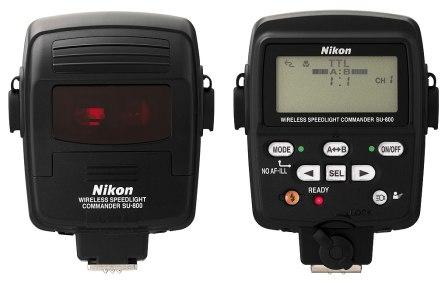
SU-800 Unit

SU-800 Unit

When you turn the SU-800 unit on, it will give you the information about the available Channel groups, their settings (TTL mode and the exposure for example) and the Channel number associated with that group. When you change any of the settings, those settings will be applied to the remote units which are under the same group and the channel as this master unit is. You can use the SEL button to change the values for the Group and the Channel number. Left and right arrow of the SEL button can be used to increase or decrease the exposure compensation value (EV) or the Channel number depending up on which settings you are in. The MODE button will allow you to program the mode of the remote flash unit. Flash can be programmed in TTL (Through The Lens) mode, AA (Auto Aperture) mode, M (Manual) mode and - - (don't trigger the flash) mode. If you want to reset all the setting at once, press the MODE and the ON/OFF together for a while and it will reset the unit to factory default settings.

The Nikon SU-800 unit can only be used as a master unit unlike other speedlight units, SB-800 or SB-900 for example. Nikon SB-800 and the SB-900 can act as a both master flash unit and the remote flash unit which I already discussed in my previous blogs. The SU-800 can control the multiple flash units in four different channels and three different groups and the combination of the SU-800 and the SB-R200 units are popular for a closeup photography or also called macro photography.

How To Setup Nikon SB-900 As a "Wireless Remote Unit"

Last time we discussed about Setting up the SB-900 as a Master Flash Unit and Setting up the SB-800 as a Wireless Remote Unit. Now, we will see how to configure a SB-900 speedlight unit as a wireless remote unit or also called a slave unit. Compared to the Nikon SB-800 and SB-600, it’s fairly easy to setup SB-900 into the slave mode. We can set the SB-900 for a remote operation by using the power ON-OFF switch or also called the wireless setting switch.

Here are the steps to follow,

SB-900-Remote-Setup-1.jpg

1. Turn the switch while holding down the button at the center.

2. Align the index on the power ON-OFF switch to REMOTE.

This is all you need to do to configure a SB-900 as a remote unit. The next step would be setting up a group and the channel number on the remote flash units.

Setting up the remote unit was pretty easy and straight forward. Now let’s setup the proper group and channel number as you have set in the camera or the Master Flash Unit or SU-800 unit whichever is controlling this remote unit.

1. Press the Function button 1, then turn the selector dial to choose a desired group name, and press the OK button.

Note : Left button to the lock sign is the function button 1 and the right one is the function button 2.

SB-900-Remote-Setup-2.jpg

Group name and the channel number being set appears to be larger than the others. For the remote flash units where the flash mode and the flash output level compensation values are to be set identically, place these flash units into the same group.

2. Press the Function button 2, then turn the selector dial to choose a desired channel number, and press the OK button.

Be sure to choose the same channel number as set on the Master flash unit or in the Commander mode on the camera otherwise they do not communicate with each other. Setting up the SB-900 is much more easier and straight forward than the SB-800 or the SB-600.

Source: A Hands-on Guide to Creative Lighting by Nikon School

How To Setup Nikon SB-800 As a "Wireless Remote Unit"

In my previous blog posts I discussed about How to configure SB-600 as a Wireless Remote Unit, How to configure SB-800 as a Master Flash Unit and How to configure SB-900 as a Master Flash Unit. Today, we are going to discuss about how to setup a SB-800 as a wireless remote unit or also called a slave unit. These are very easy and simple steps to configure a Nikon SB-800 unit as a remote flash unit. Let's jump right into it.

SB800-remote-1.jpg

1. With the flash unit turned on, press and hold the SEL button for two seconds.

2. Locate the shaded box and use the toggle to highlight the wireless symbol.

3. Press the SEL button for one second and the top single arrow will be changed to up and down arrows.

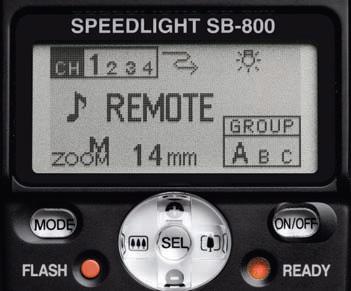
4. Scroll down and select the REMOTE by highlighting it and pressing the SEL button for two seconds. The display will then change to the Remote view.

SB800-remote-2.jpg

5. Press the SEL button to highlight "CH", use "+/–" to select the channel. The Remote and the Master units must be set to the same channel or else they will not communicate with each other.

6. Press  the SEL button again to highlight the group. Use "+/–" to choose Group A, B or C.

Note: Please be sure to choose the same channel number as set on the Master flash unit or in the Commander mode in your camera.

The amount of the output compensation set for Groups A, B and C on the Master Flash will determine the amount of the output from the Remote Speedlights. Once you are done with the setup, the SB-800 is ready to receive the signal from the master flash unit and fire the flash.

Source: A Hands-on Guide to Creative Lighting by Nikon School