Nikon ML-L3 Wireless Remote Control

Remote shutter release method will come handy when you want to capture a fireworks, do night photography or any other kind of long exposure shooting where the movement of the camera will be the reason to get blurred image. If you want to trigger the camera shutter remotely, you have two options; one is to use a wired remote shutter release cord and the other one is to use a wireless remote control device. Few months ago, I wrote a blog about Nikon MC-DC2 wired remote shutter release cord and today I want to write about my experience with the wireless remote control device, Nikon ML-L3, to remotely control the shutter release. There are a lot of rumors and speculations about using the wireless remote control but I will express my opinion based on my own experience about the accessory and get your feedback as well.
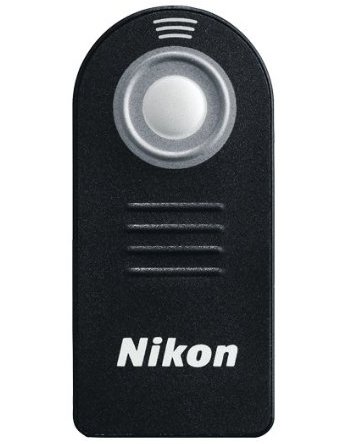
Nikon ML-L3 Wireless Remote Control

Nikon ML-L3 Wireless Remote Control

In the past few weeks, I read some reviews about the ML-L3 where reviewers mentioned that it has to have a proper line of sight with the camera IR sensor to trigger the camera shutter remotely otherwise the device won’t work. If you are buying it without knowing this limitation of the IR technology, you might be disappointed with your decision. I think it is a limitation of using any system that works in a Infrared technology that the line of sight is a must for it to work. If the remote is completely out of sight with the camera, it might not work at all but in my experience, I have worked it out by trying from different angle pointing towards the camera. And the other feature that many people are concerned about is it's Autofocus feature. There is no doubt that this remote is able to autofocus the lens before triggering the shutter but it will not re-focus if the shutter release button has already been pressed halfway down to focus the subject. To focus using a wireless remote control, it would be better to compose your shot but do not press the camera's shutter release button half way down to focus it but instead, use the wireless remote control unit.

When you purchase the device, it might not come with the instruction to properly setup and connect the device with the camera. Here is a brief instruction on how to sync your wireless remote control with your DSLR camera.

How to use ML-L3 Wireless Remote Control?
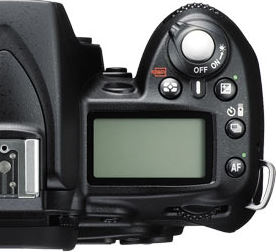
Nikon D90 Top View

Nikon D90 Top View

To setup a wireless remote shutter with the camera, most of the Nikon DSLRs come with the menu option. If you go to the Custom Settings Menu (CSM) with the pencil icon, you will see the Release mode. This is where you can specify which method you want to use to release the shutter button. With the Nikon D90, its even easier than that. D90 and many other new DSLRs come with the release mode button just to the right side of the LCD panel. This button has a set timer icon and a wireless remote icon nearby. While pressing that button, you have to rotate the main command dial to change your release mode option. Nikon D90 gives you four different options when you rotate the command dial. You can choose for a single shot, continuous shooting, shoot in a timer mode or wireless remote mode. Once you change your release mode option to the wireless remote (it will display a wireless remote icon on the LCD), you are ready to use the wireless remote control to trigger the shutter remotely.

Nikon ML-L3 Wireless Remote Control supports Nikon P7000, D3000, D40, D40x, D50, D5000, D60, D70, D7000, D70s, D80 & D90 Digital SLR Cameras.

How To Setup Nikon SB-800 As a "Master Flash Unit"

If you want to control other flash units remotely using a SB-800, you have to set it up as a master flash unit. And here are the few steps to configure a SB-800 flash unit as a Master Flash Unit.

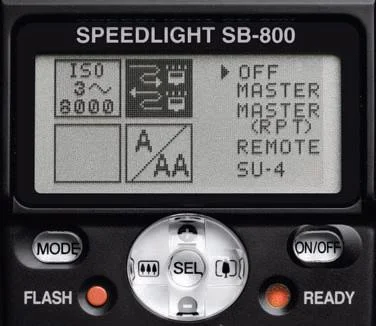
SB-800-1.jpg

1. With the SB-800 unit turned on, press and hold the SEL button for two seconds and the display will be changed.

2. Locate the shaded box and use the toggle buttons to highlight the wireless symbol.

3. Press the SEL button for one second. By doing so, the one right arrow pointing towards the OFF will change to two arrows (up and down) and the OFF selection on the right will be shaded.

SB-800-2.jpg

4. Scroll down and select the MASTER by highlighting it and pressing the SEL button for two seconds. The display will then change to the Master view.

5. Press the SEL button to highlight "M". By pressing "+/–" you can change the flash output compensation value for the "M" group. Pressing the MODE while a group (M, A, B or C) is highlighted will change how the Speedlights in that group will react.

Available Flash Modes: TTL - Through The Lens metering A - Auto Aperture M - Manual - - No light output (although in M - - a preflash will occur)

SB-800-3.jpg

Press the SEL button to jump from group M to A to B to C. Set the amount of flash output compensation for each group using "+/–" as you go.

6. Use the SEL button to highlight “CH” and use "+/–" to select the channel you will be working in. There are 4 channels which allow multiple photographers using the Nikon Creative Lighting System to control only their own Speedlights.

Note: The channel you choose for the Master Speedlight must be the same channel the remote units are set to.

7. Attach the Master Speedlight to your camera and you are ready to control other speedlights remotely.

If you are looking for how to configure a SB-900 and a SB-600 flash units in a wireless mode, here are the links for How to setup the SB-900 as a Master Speedlight Unit and How to setup SB600 flash to work in Commander Mode.

Source: A Hands-on Guide to Creative Lighting by Nikon School

How To Setup Nikon SB-900 As a "Master Speedlight Unit"

You can configure a Nikon SB-900 speedlight unit in a Master or a Commander mode by using the Power ON-OFF switch, also known as wireless setting switch. Here are the few steps you can follow to configure a SB-900 flash to work as a master unit.

sb-900-power-on.jpg

1. Turn the switch while holding down the button in the center.

2. Align the index on the Power ON-OFF switch to MASTER.

This is all you need to do to make a SB-900 work as a master unit.

Now, let’s talk about setting the flash mode, flash output level compensation values and the channel number on the master flash unit.

1. Press the Function button 1 on the Master flash unit to highlight “M”.

Note: Left most button on the second picture (left to the lock sign) is Function Button 1 and right button to the lock sign is Function Button 2.

2. Press the MODE button, then turn the selector dial to choose the desired flash mode, and then press the OK button.

3. Press the Function button 2, then turn the selector dial to choose the desired flash output level compensation value, and then press the OK button.

Available Flash Modes: TTL Through The Lens metering; A Auto Aperture; M Manual; - - No light output (although in M - - a preflash will occur)

Available Flash Modes: TTL Through The Lens metering; A Auto Aperture; M Manual; - - No light output (although in M - - a preflash will occur)

4. Press the Function button 1 to highlight the Group ”A”. Group A is selected by default but if you want to select a different group than A, turn the selector dial to choose a different group name.

5. Repeat the procedures in step 2 and 3 to set the flash mode and the flash output level compensation values for the remote flash units in Group ”A”.

6. You can repeat the entire process to set the flash mode and the flash output level compensation values for the remote flash units in Group ”B” and ”C” as well.

Note: After setting the output compensation value, press OK twice to reveal the ”Ch” above Function button 2.

7. Press the Function button 2, then turn the selector dial to set the channel number, and press the OK button.

Note: The channel you choose for the Master Speedlight must be the same channel the remote units are set to.

8. Attach the Master Speedlight to your camera and you are ready to control other flash units using SB-900.

If you are looking for how to configure a Nikon SB-800 and a Nikon SB-600 flash units in a wireless mode, here are the links for How to configure SB-800 flash unit as a Master flash unit and How to set SB600 flash to work in a Commander Mode.

Source: A Hands-on Guide to Creative Lighting by Nikon School