Nikon MC-DC2 Wired Remote Shutter Release Cord

Nikon MC-DC2 wired remote shutter release cord is primarily made for Nikon D90 and D5000 DSLR camera. MC-DC2 simulates the work of the shutter release button for the DSLR. When you press the shutter release button of your MC-DC2 halfway down, it will focus your subject (provided that your camera is in Autofocus mode) like it does when you press the shutter release button on the camera. It also has a lock feature to hold it down for a long exposure shooting while using the BULB mode. You will have more control over your camera using this cord vs Nikon ML-L3 Wireless Remote Control. MC-DC2 is 41" long and enough for you to move around your camera freely. When you want to shoot long exposure photographs like fireworks shooting or night scene, this cable works best to avoid any camera shake. MC-DC2 also works best when you want to shoot a macro. You can setup your camera on the tripod, check your cable connection and enjoy remote shooting. This unit is small, lightweight, and fits in your camera bag with ease. If you are looking for something to avoid camera shake while shooting, MC-DC2 can be your best friend.

How to use the remote shutter release cord?

Nikon MC-DC2

Nikon MC-DC2

Using MC-DC2 wired remote shutter release cord is really simple. When you want to use the shutter release cord, you just have to turn your camera off (if your camera is on) and then plug-in the cable to your camera port (single port on the left side on Nikon D90). Next step would be to turn on your camera and the shutter release cable is ready to use. You don't have to change or adjust any settings on your camera to make this cable work. As soon as you plug the cable in, it starts working as a remote shutter release button.

I bought this cord for Nikon D90 couple of months ago to shoot fireworks. I paid around $35 and it does exactly what it says it does. I am very happy with the purchase.

Movie Settings Menu In Nikon D90

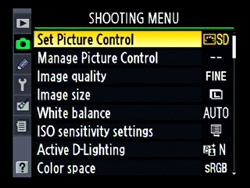
Nikon D90 is the world's first DSLR camera to record HDTV movie with sound. It gives you three different options of recording movies and today we are going to discuss the movie settings menu available in Nikon D90. When you press the menu button on the back of your camera, you will be given different choices of menu settings for your camera. But right now we are interested in a movie settings option and for that, lets go to the Shooting Menu option (camera Icon) and scroll all the way down to the Movie settings menu and click OK. Actually there are not much settings to be done to record a movie with D90 but you can adjust movie quality (frame size) using this menu option and enable or disable the sound recording option. Nikon D90 shoots all the movie clips at the same rate, 24 frames per second. Here are the few options you can set under this menu.

  • 1. Quality

  • 2. Sound (press OK to enable or disable sound recording option)

When you select Quality and enter OK, you will be presented with three framing size options.

Nikon D90 movie settings menu

Nikon D90 movie settings menu

1280x720 (16:9): This option will let you shoot in HDTV quality movies in the 16:9 aspect ratio. As this mode allows High Quality movie, it consumes more space in your memory card. Main disadvantage of this mode is, it allows you to shoot only 5 min of HDTV movie. But this framing size is best viewed on big screen TV.

640x424 (3:2) : This is the default option set to Nikon D90. This mode allows you to record non-HDTV video as of normal non-HDTV camcorders and best viewed on small size monitor. This setting allows you to record 20 minutes of video. Personally I use this setting to record video with my Nikon D90.

320x216 (3:2): This mode is used to produce compact framing movies and allows you to record 20 minutes long video.

After you set the framing size, click Live view (Lv) button on the back of your camera and press OK to start recording video and press OK again to stop the recording. Nikon made it very easy and simple enough to a record video with Nikon D90.

Shooting HQ Video With Nikon D90

My first DSLR camera was Nikon D60 which I loved so much but one thing I missed in my D60 was video recording. I wished Nikon could have included video recording feature in D60. But better late than never, Nikon came with another powerful camera, Nikon D90, with the video recording feature in it. Nikon D90 is considered as the first DSLR camera to record high quality video with the sound. I am glad that Nikon brought this feature with D90 for which I waited for a year or more. I finally got my hands on D90 this march and can’t wait to do some experiments with it even though I am more interested in taking still pictures. Obviously D90 shoots amazing sharp pictures with rich color and the greater details of the subject. Nikon D90 has a CMOS sensor built into it and is able to capture 12.3 Mega Pixel photo which is enough to print large size pictures for family gathering, wedding pictures and other daily events. There is no doubt that Nikon D90 is an excellent DSLR to capture your moment of life with amazing quality photo but now D90 also comes with the additional feature of taking video which can add extra flavor to your photography life.

Despite of being excellent HQ quality movie camera, D90 has some downsides while recording the video. D90 lacks Autofocus feature while taking videos. That means you have to manually focus your subject with one hand using the focusing ring on the lens barrel and hold the camera with another hand. If you are not using tripod to capture a video, I guess it would be very hard to hold D90 along with the with the heavy lens like 18-200mm for a long time. I believe most of the people don't shoot video with D90 but rather carry a small camcorder to record the video. But we can't ignore the fact that D90 records HQ video and can use it whenever we need it in case of emergency.