What Is Bokeh Effect In Photography

There is no doubt that photography is one of the fastest growing passion among people of different ages. They want to try different techniques and tools to enhance their photographic skills. Bokeh is currently the fastest growing fads in modern photography. Bokeh term is used to represent the shape of light which is blurred in the background of the photo. But nowadays, there is a trend to use the filter of different shapes, heart or stars for example, to create customized shape of the bokeh. These customized shapes are achieved by using the bokeh filter over the camera lens. Bokeh is a photography term derived from the Japanese word for "blur" or "fuzzy". Bokeh refers to the unfocused background in a photograph. Bokeh filter is a simple filter that clips onto the front end of your lens and hence the filter blocks out pieces of light that cause the bokeh (blur) effect in your images to take the shape of the filter.

Bokeh filter produces nice shape when you use it with big aperture lens so that the foreground will be in focus and the background out of focus. The more out of focus the background lights are, the better the results will be. Soft and blurred background with smooth edges is considered as a good bokeh because sharp edge bokeh is usually unpleasant to our eyes.

Here is one of the pictures I shot at 2010 cherry blossoms festival in Washington DC. You can see the bokeh effect on the background where out of focus background images are making fuzzy circles kind of shapes. This bokeh effect was the result of shooting with small aperture value (large opening of the aperture) while maintaining the proper distance with the subject without using any bokeh filter. In other terms, we can also say that this picture has shallow depth of field. If you are interested in knowing more about DoF, please read my blog titled “what is depth of field?”.

Bokeh effect on cherry flower

Bokeh effect on cherry flower

Focal Length - 200mm     Aperture - f/6.3     Exposure - 1/640sec     ISO - 200

Please feel free to share your comments and question if you have any. And if you want to share your bokeh photography, you can also insert the link into the comment section. Happy Shooting!

Nikon Flash And The Commander Mode

Nikon Commander Mode allows you to control the remote flash unit(s) from your camera wirelessly. If you use an external flash, this blog might be helpful to understand what is the commander mode, what is it used for and how does it work on your DSLR camera? Commander mode is one of the very powerful feature available in most of the advance Nikon DSLR cameras including Nikon D80, D90, D200, D7000, D700 and D300 that allows your camera's built-in flash to control the remote (off camera) flash by sending an infrared signal over the wireless media. Most of the today's flash unit like SB-600, SB-800, SB-900 and SB-R200 support commander mode except SB-400. Nikon SB-400 is not considered as an Advance Wireless Lighting strobe. It can only be used in the hot-shoe or with a sync cord connected to the hot-shoe. Let’s discuss few possible scenarios in which you can use SB-900, SB-800, SB-600 and SB-R200 speedlights.

SB600.jpg

Nikon’s SB-800 or SB-900 unit can also be used as a master unit (like the camera’s built-in flash in a commander mode) to control other flash units like SB-R200, SB-600 or even other SB-800 and SB-900 units wirelessly. But SB-R200 and SB-600 can't trigger other units and can only work in a slave mode (to be triggered by either camera’s built-in flash in a commander mode or other master unit like SB-800 or SB-900). So, based on their capabilities to act as a master unit or slave unit, we can use them in three different scenarios.

First scenario - If you have Nikon SB-900 or SB-800 flash unit, you can place it on the camera hot shoe and set it in "Master Mode" to trigger other master or slave units wirelessly.

Second scenario - If you have SU-800 Wireless Commander Unit, you can place it on the camera hot shoe and control any external flash unit (in slave mode) wirelessly.

Third scenario - And if you do not have SB-900 or SB-800 or SU-800 but only have slave flash units, SB-600 for example, you can trigger them using the built-in flash of your camera by configuring it in commander mode and that is what we are going to discuss in our next section.

Let’s go through the camera settings for Nikon DSLRs to set up a built-in flash unit into commander mode so that we can control the external flash units using camera's built-in flash.

How to set the commander mode in Nikon DSLR?

In this setup, I am taking Nikon D90 as an example but you can use this setup for any other Nikon DSLR that supports built-in flash to be in commander mode. Let's go right into the setup now.

1. Press the Menu button on the back of your camera.

2. Go to Custom Setting Menu option (pencil icon).

3. Select e, Bracketing/flash, menu and press OK.

4. Select e2, Flash cntrl for built-in flash, and press OK.

5. Choose the Commander Mode.

commandermode.jpg

When you are inside the Commander mode, you can set different parameters to control the remote flash unit. You just have to be careful about which Group and Channel you select because you are going to use the same Group and the Channel settings in your remote flash units as well. Group is set to combine the multiple flash units in a single or different groups for the exposure settings and the Channel is used to avoid any interference with other camera's settings around you (used by different photographers if there are any).

Now, let's discuss about the different options your camera’s built-in flash unit can be set to.

  1. TTL - Through The Lens. If you select this option for the built-in flash, it will fire the pre-flash first, collect the exposure information from your subject Through The Lens (TTL) and send that information to the external flash unit(s). Then, your built-in flash also fires the main flash along with other external flash units to illuminate the subject.

  2. AA - Auto Aperture Mode. This is an older implementation of the TTL system and not used much these days.

  3. M – Manual Mode. This mode allows you to set the flash power manually rather than auto adjusted based on TTL information your camera gives.

  4. - - If you set the built-in flash into - - mode, your built-in flash will fire the pre-flash first, collect the exposure information from the subject and send that information to the external flash units so that the external units can set the flash power to illuminate the subject properly. In this setup, built-in flash doesn't fire the main flash to control the exposure but only send the exposure information to the external units. But if your subject is too close to the camera, pre-flash from the built-in flash might have some influence on the overall exposure of the image.

Important - After finish setting up your camera's built-in flash into the commander mode and an external flash unit to receive the signal, please do not forget to pop-up your camera's built-in flash. When you are ready to trigger an external flash units, it is important to pop-up built-in flash of your camera because this is how your camera sends the signal and the exposure data to an external flash units. It works great with my Nikon D90 and D700 using a SB-600 as an external unit and controlling it using camera's built-in flash. If you are having any problem working with this settings, please let me know and I will be happy to help you in any way possible.

Night Shooting Around Memorial Parks In Washington DC

When I visited around National Mall recently, I regretted for not taking my camera gears with me. Since then, it was always on my to do list to capture the beauty of DC monuments at night. As soon as the weather was nice for night shooting, I went there last Saturday with my Nikon D90, 18-200mm VR II telephoto lens and the tripod. While I was waiting for the lights to be fully illuminated, I scouted around couple places to shoot. My idea was to capture well lit monuments with the dark background. As the evening got darker and darker, the light intensity was increasing slowly over the memorial areas and I noticed few photographers who were coming with their camera gears and setting up for the photo-shoot. At around 10 PM, all the monuments were shining on the bright lights in the backdrop of dark evening. It was such a beautiful and amazing view which can’t be explain in words but you have to be there to experience it. If you are interested in photography and live in the United States or even outside for that matter, I think it’s one of the place to visit.

I met couple of professional photographers there and learned quite a lot from them. I met Andy Walker from North Carolina who was a professional photographer for many years and taught me various techniques of photography and showed me some of his amazing arts including recent rocket launch shot he captured at NASA (Kennedy Space Center) in Florida. I walked around with Andy and took this shot inside the Lincoln Memorial.

Lincoln-Memorial.jpg

Exposure - 4sec     Aperture - f/16    Focal Length - 105mm    ISO - 200

If you are also planning to shoot around the memorial parks in Washington DC, please keep in mind that you are not allowed to use a tripod inside the Lincoln memorial. If you want to take a close-up shot of the Lincoln, you have to bring a telephoto lens with you.

Here is the outside view of the Lincoln Memorial.

Lincoln-Memorial1.jpg

Exposure - 8sec     Aperture - f/14    Focal Length - 31mm    ISO - 200

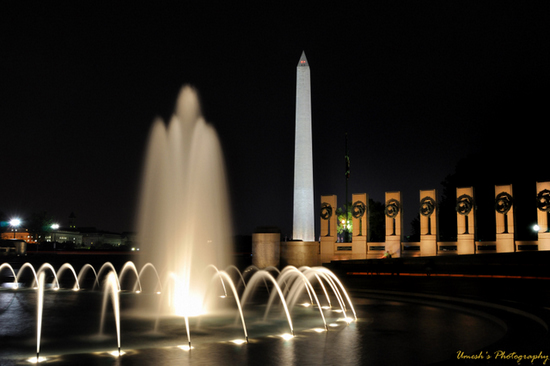
And here is the World War II Memorial with the Washington Monument standing in the background.

World-War-II-Memorial-II.jpg

Exposure - 10sec     Aperture - f/16   Focal Length - 24mm    ISO - 200

It is an amazing place to be at night and if you like doing night photography, it's one of the best place to visit. If you have been there or planning to go someday, please feel free to share your experience.

If you are looking for the camera settings to take long exposure shot, fireworks for example, you may want to review my blog post on how to shoot fireworks with Nikon D90. Depending on your requirements and lighting environment, Shutter speed, Aperture, ISO and other camera settings may vary but it will give you some insights about camera settings to begin with and you can change them as later you get more experienced photographer.

Happy shooting!