Is Post Processing Necessary In Digital Photography?

This post is a part of our Q&A section. If you want to submit your question, please use the form in the Contact page.

QA.jpg

Afrina (Kuala Lumpur, Malaysia) asked : I am not a pro photographer but I enjoy photography. When I visit the flickr and other photographers' website or blog, they have a collection of amazing photographs. Some of the photographers also revel what editing tool they used and what was done on the picture during post-processing. Do you think it is necessary to use any software to make your photograph look good?

I have seen this confusion on many photographers from different level of expertise. I think this wouldn’t be that much of interesting topic when you are just starting photography but as you progress more on your composition skill and master your camera settings, the next stop would be the editing skill. I also went through the same situation a while ago and started looking my option for post-processing. When it comes to the editing, different photographers have different views about the process and the tools they would like to use. Even after reading many blogs and online tips, the answer was not so clear to me whether the editing skill is a must to have to enhance your photography or it is just an optional choice. Some of my friends jokingly say that, if you are using Photoshop to enhance your photographs then it's not a photography, it is a Photoshopgraphy. I find it funny but meaningful statement at the same time. When I see other photographers’ work, I forget all the critics and feel like editing is a must have skill set and is one of the important part of digital photography. After doing much research, I wrote a blog about post processing where I discussed more about the post-processing and listed down some of the best known post-processing software in the market.

To be honest, it is not always necessary to use a software and process the pictures but sometimes you find it necessary just to tweak some settings, adjust colors and lights or even crop the sides. Some people think cropping is not really a post processing but I would say, if you use any software to manipulate the photographs by any means, it is a post-processing because you processed the photographs after taking it out from the camera.

Let me present you an example of a photograph, before and after processing it, and you shall decide if post-processing is really necessary or not. And also, as always, I welcome your comments as well.

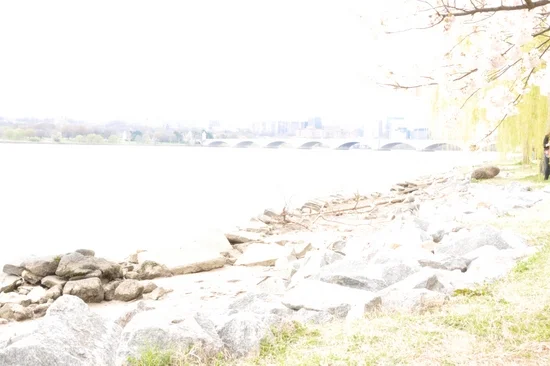
Before post processing

Before post processing

I took this photograph of the Lincoln Memorial Reflecting Pool last year. When I came home and downloaded the picture from the camera, I felt good about it's composition (symmetry) but felt like I was missing something on the picture. I was not really happy with the color contrast and thought of playing with the color tones and the contrast and see how will it become. I started editing the picture using Capture NX2, one of my favorite software to process RAW images. During the processing of the image, I increased the color contrast and adjusted the brightness of the picture which transformed the picture into the next level. Just a couple of small tweaks boosted the mood of the image and the result was very impressive. The picture looked more vibrant and lively after the post-processing.

After post processing

After post processing

The result is in front of you and I let you decide whether the post processing is really necessary in digital photography or not. But looking at the transformation this image got, I think you would agree that post-processing is an essential tool and may greatly help you to enhance the picture if done correctly. You just have to be careful about not doing it too much, otherwise it may not look natural.

The Rule Of Thirds In Photography

If you are into photography world, you should have heard the term "Rule of Thirds" by now. And if you are here reading this blog, that means you want to know more about the rule, right? When you are taking any photography courses or learning the basics of photography, you should have come across the term at least once. It is probably the most well known and the widely talked principle of photography composition. Even though it is one of the few rules for composing photographs, it is not necessary to follow the rule of thirds every time you shoot. Sometimes you may produce an excellent shot without the rule being applied and sometimes the rule may come handy to make your picture look more appealing to the viewers. Sometimes, photographers who know already know about the rule, breaks the rule and apply their own. I do not disagree with this argument and sometimes rules are meant to be broken.

But if you want to break the rule, it is important to know more about the rule that you are breaking and find out what kind of impact would the rule have made into your photographs. You can't just say that I am breaking the rule of thirds in this photograph without knowing what the rule of thirds is about. I have not necessarily followed the rule myself every time when I go out and shoot but sometimes applying the rule had made really big difference on how the picture draws the viewers attention into it. Let’s talk briefly about the rule first, and then you can apply it in your composition or break the rule if you find it necessary for the photograph.

What is the Rule of Thirds?

Rule of Thirds is a photographic composition principle where you break down your photographs into a third, both horizontally and vertically, like a tic-tac-toe board so that you have a total of 9 equal boxes framed inside the photograph. While you are composing the shot, you would imagine these boxes in your mind while watching through the viewfinder. After you draw the rule of thirds grid on your mind, it gives you few important parts (four intersecting points and four lines; horizontal and vertical) of the photograph where you should consider placing the point of interest so that the viewers find the picture more attractive and natural. Some of the DSLR cameras come with an option to have a actual grid displayed on the viewfinder screen while composing the shot. And as you practice more and be comfortable with composing the shot according to the rule, you can remove the grid display from the viewfinder (if it is distracting) or continue to use it if it is helping you to compose the shot.

ruleofthird.jpg

The theory behind the rule of thirds is when you place the point of interest of the photograph on the intersection points or along the lines, photograph will be more balanced and look natural to the viewers. It makes the use of natural tendency of the human eye to be more strongly drawn towards these intersections rather than to the center of the shot.

When you shoot portrait photographs, eyes are the natural focus point and you should consider aligning the body to one of the vertical lines. Usually, same is true for the wildlife photography as well with some exception.

Portrait-rule-of-thirds.jpg

Likewise, when you are shooting landscape, it is a good practice to position horizon along with one of the horizontal lines so that the picture look more structured and well balanced.

Lincoln-Memorial1.jpg

Even if you can't frame the subject using the rule of thirds during the composition, it may not be that big of a deal nowadays thanks to the high resolution digital cameras and the varieties of the post processing tools available in the market. While you are editing the picture on the computer, you can display the rule of thirds grid during the cropping process and can also drag the grid around to place the point of interest according to the rule and crop the image once you are satisfied with the composition.

How To Tell My Camera To Focus On Particular Area?

This post is a part of our Q&A section. If you want to submit your question, please use the form in the Contact page.

QA.jpg

Lita (Manila, Philippines) asked :  When I am taking pictures of wildlife, I use Autofocus (AF) most of the time for obvious reasons. And most of the time when I try to frame and focus the animal, trees and branches get focused instead of the main subject. How can I force my Nikon D90 to focus on particular area?

Lita, if you do not want camera taking the control of the focus, short and quick answer is to manually focus the subject. When you manually focus using the focusing ring on the lens barrel, you can select the area to be in focus whether it would be in the middle of the frame or at any other focus point. But we all know that focusing manually is not a practical solution specially when you are shooting wildlife and that is the reason our DSLRs come with the autofocus option to quickly focus your subject. And autofocus works perfectly in most of the situations but sometimes you may encounter the problem you have described in your question. When you are using the Manual Focus mode, you can take over the control of the focusing system but the good news is that, your camera Nikon D90, may have a solution for the AF users as well.

Nikon D90 Back View.png

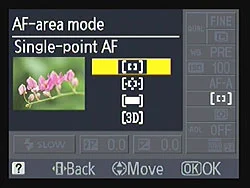
When you are shooting in Autofocus mode and want to take the control of the focusing system, you need to change the Autofocus option inside the Custom Setting Menu (CSM). By default, Nikon D90 selects the focus point automatically based on the information it gets through the lens and that was the reason, sometimes, you were encountering the focusing issue. And the reason is, your camera can not differentiate between the subject and the object inside the frame. To change that default setting, press the MENU button on the back of your camera and go to the CSM menu (Pencil Icon). Then choose the first option (a Autofocus) and select the Single Point. When you select the autofocus point to a single point, you can now select the focus point by using the Thumb Pad (Multi-selector button) on the back of your camera and lock the focus point wherever you want by using the AF Selector Lock lever next to the LCD screen. This guarantees that the camera is focusing on your intended subject because you've told it in advance which of the 11 AF points to use for the focusing.

Wild-Cat1.jpg

Note: If you want to lock the focus point into one spot, please make sure that the lever next to the LCD screen is switched to the L (Locked) position after you select the preferred focus point, otherwise, you might inadvertently select a different AF point by bumping into the thumb pad. The lock switch was designed to prevent such accidental change of the focus point and works really well. Your camera locks the focal point in L position of the lever switch and allows you to change focus point when the lever is set to the Unlocked (Single DOT) position.