Understanding An Aperture And The Depth Of Field

In my previous blog post, we discussed about the shutter speed and it's effect on the exposure. Now, lets discuss about an Aperture, one of the three pillars in photography along with the shutter speed and an ISO, and it's relation with the shutter speed in exposure setting. To set an aperture value, your camera should be either in Aperture Priority mode (A) or in Manual Mode (M). If you are using an Aperture priority mode, you change an aperture value and the camera adjusts the shutter speed automatically to balance the exposure. And if you are using Manual mode, you can set the shutter speed and an aperture value independently. I already discussed about ISO and shutter speed in my previous blogs and today I am going to explain about an Aperture and how it affects our photographs.

What is an Aperture?

When the shutter is opened to allow lights into the censor, light must pass through a window called an Aperture. Sometime it's compared with the pupil in a human eye. Wider the aperture, more lights come into the censor and vice versa. An Aperture is also called a F-stop and it's value is called F-stop value. F-stop value is indicated by f and followed by the number value.

F-STOP Values

F-STOP Values

For example f2.8 (also written as f/2.8) means wider aperture and allows more lights. Similarly f22 means narrow aperture and allows less lights into the censor. Difference from one aperture value to immediate next value is called one full stop value. This term is frequently used when we deal with the exposure setting. For example, if your lens F-stop value is in f2.8, f4, f5.6, f8, f11, f16 and f22 series, moving an aperture from f2.8 to f4 is called one full stop and decreases the brightness of your picture by one full stop (it will allow only half amount of lights than in f2.8). So once again, changing an aperture value by one full stop up (from 2.8 to 4) will allow half the light and one stop down (from 4 to 2.8) will double the amount of light hitting to the censor of the camera. To calculate the aperture values in a full stop value (1 EV), you can use the formula below.

Full Stop.JPG

Nowadays, in modern digital cameras, aperture value, shutter speed and ISO values can be set in a fractional value rather than one full stop value. Almost in all modern digital SLRs, these exposure values can be adjusted and decreased or increased in the faction of one-third, two-thirds or one full stop value. The most common fractional value is one-third stop (​1⁄3 EV) but some cameras use half-stop value as well. If you look at the diagram above, we jumped the aperture value from f/2.8 to f/4 which is one full stop change. But, if you want the aperture one-third stop smaller than f/2.8, you would set the aperture value to f/3.2 and if you want two-thirds smaller, it would be f/3.5, and finally one full stop would be f/4. The next few f-stops in this sequence would be f/4.5, f/5, f/5.6, f/6.3, f/7.1, f/8, etc. which can be calculated by using the formula below.

One-Third Stop.JPG

And if you want to calculate the aperture values in half-stops, you can use the formula below.

Half Stop.JPG

What is Depth of Field?

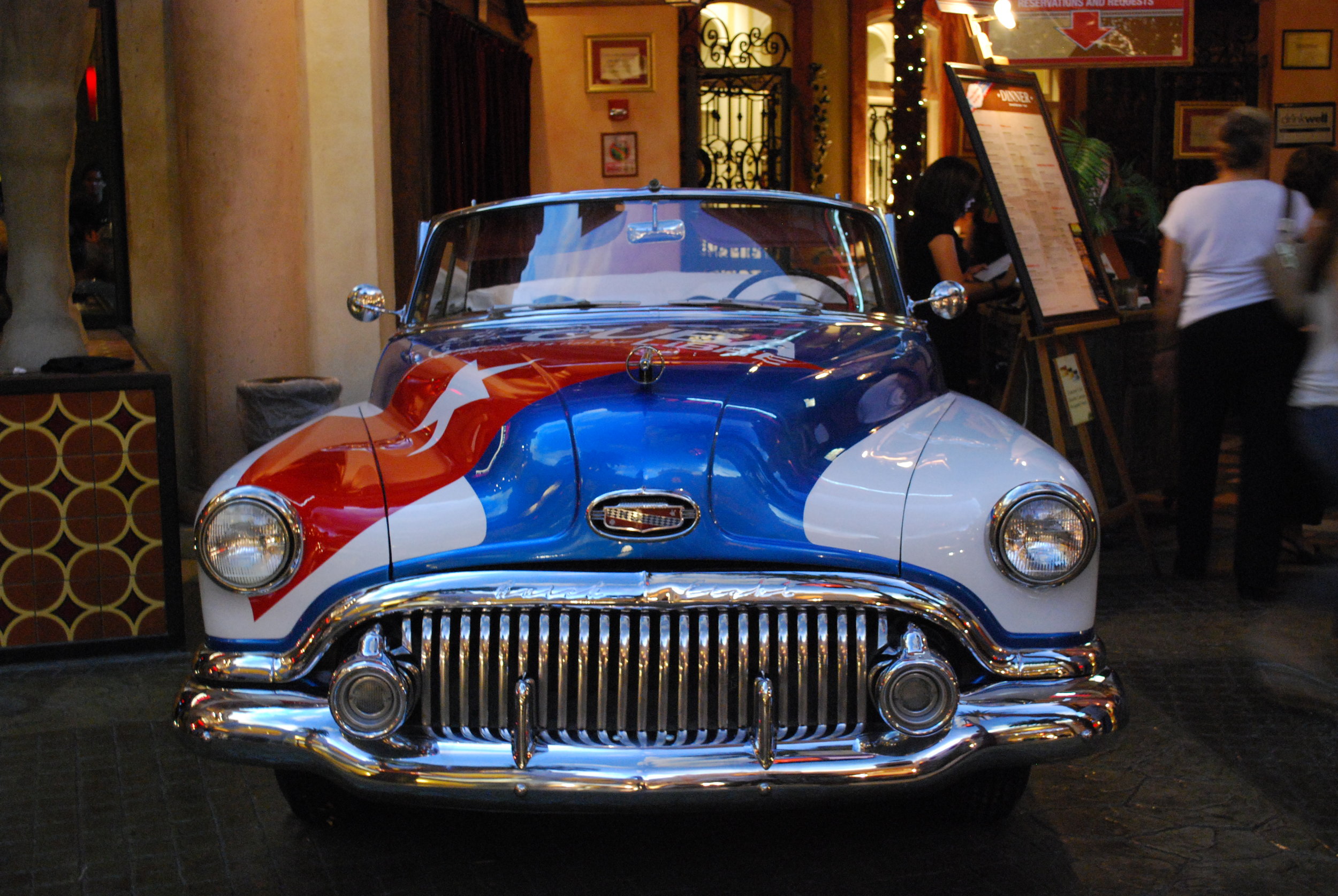
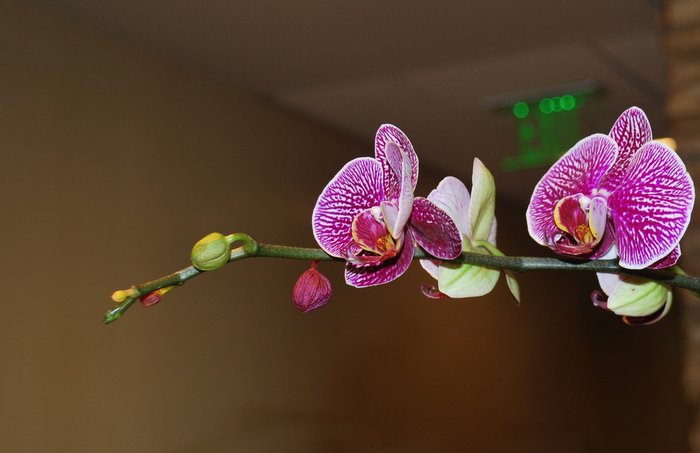
Depth of field is an effect of using different aperture settings. When you use a small aperture value (that means wide opening of the lens and allows more lights), you will get the sharper image of a small area or the foreground area and the blurry image of the background area. Less aperture value means less area of the subject will be in focus and results into shallow depth of field. But when you use big aperture value (that means narrow opening of the lens and allows less lights), more wider area is in focus and everything that you see through the view finder will be in equal focusing mode resulting into deep depth of field. Generally, we use shallow depth of field while shooting macro objects like flowers, insects etc and deep depth of field is required while shooting landscape to be everything from foreground to background in focus.
Shallow depth of field

Shallow depth of field

Shallow Depth of Field

Focal Length - 32mm     Shutter speed - 1/60    Aperture - f5     ISO - 200

Deep depth of field

Deep depth of field

Deep Depth of Field

Focal Length - 85 mm    Shutter Speed - 1/2    Aperture - f/16     ISO - 200

Take and Give relation

Exposure can be set by changing an aperture value, shutter speed or different combination of shutter and aperture value. When you take one F-stop from an aperture, you can give one F-stop to the shutter speed to match the same exposure. Moving from one shutter speed to another one is also one full F-stop jump like in an aperture value.

Aperture Full Stops:

1, 1.4, 2, 2.8, 4, 5.6, 8, 11, 16, 22, 32, 45, 64

Shutter Full Stops:

1/1000s, 1/500s, 1/250s, 1/125s, 1/60s, 1/30s, 1/15s, 1/8s, 1/4s, 1/2s, 1s

Fundamentals Of The Shutter Speed

In last few weeks, I have got several requests from the readers to write about Shutter Speed, Aperture and ISO; three pillars of photography also known as exposure triangle. If you are reading about photography or want to learn the basics of photography, you would see these terms almost everywhere. These are the foundation and very fundamental settings for your camera. When you shoot in Auto mode, camera calculates these parameters for you but if you want to have more control of the lighting or exposure, you have to use either semi-manual or Manual mode and select these values manually. To change the shutter speed, your camera should be either in Shutter Priority mode (S) or in Manual Mode (M). If you are into Shutter priority mode, you change the shutter speed and the camera adjusts an Aperture value automatically to balance the exposure. And if you are using Manual mode, you can set the shutter speed, an aperture value and ISO independently. In this blog, we will discuss more about the shutter speed.

What is the Shutter Speed?

Shutter speed indicates how fast the shutter of your camera opens and closes while taking picture. When you press the shutter release button, it opens the shutter of the camera, allows lights from the subject to the censor of the camera and closes it. The time difference of the opening and the closing of the shutter depends upon the shutter speed. Higher the shutter speed faster the shutter opens and closes. Similarly, lower the shutter speed, shutter will open for a long time. Shutter speed is directly related to the exposure settings of your camera. Higher shutter speed means it will allow less lights into the censor but captures fast moving subject (freezes the motion of the moving subject) by closing the shutter quickly. Lower shutter speed is used when you want to allow more lights into the censor and capture the activity. While using the slower shutter speed, you have to be careful of the camera movement. If you are shooting with the slower shutter speed without using tripod, you might get blurry picture because of the camera shaking.

Tip: Relationship between the Focal Length and the Shutter Speed

The general rule of thumb is: If your lens is not a VR (Vibration Reduction) lens and you are not using a tripod, your shutter speed should be at least 1/(focal length) of the lens to avoid blurriness on the picture due to camera shake. For example, if you are shooting handheld with 105mm non-VR lens, you should use 1/105th seconds of the shutter speed to get sharper image. If you are using a VR lens, you can decrease the shutter speed up-to 2 to 4 stops depending on the lens because you would gain that much light by turning the VR feature on.

Now, let’s look at how the shutter speed is indicated on camera and what does it mean to you as a photographer.

Shutter speed is indicated by the whole number or the fraction or special notation, BULB. The whole number is generally followed by a double quote to indicate that it is in a second format. The fraction value is represented as a number without a quote. For example, if you see 2" in your viewfinder, it means the shutter will open for 2 seconds. But if you see 60 in your viewfinder, that means your shutter will open for 1/60th of a second. Generally in a viewfinder, you won't see it in a 1/60 format but if you see a whole number without a quote, you have to understand that it's a fraction of a second. When you see a BULB, it means that your shutter will be opened as long as you press the shutter release button and until you release it.

Faster shutter speed to freeze motion

Faster shutter speed to freeze motion

I took this picture above with the shutter speed of 1/1000th of a second and you can see how the birds’ movements are frozen.

Slower shutter speed giving silky water effect

Slower shutter speed giving silky water effect

This picture was taken at the shutter speed of 10 seconds using a tripod. I wanted to get the silky water effect with a long exposure setting and I was shooting in a very low light condition (at night) as well.

You want to use a faster shutter speed to freeze fast moving subjects like running players in a sports events or playing kids or racing cars etc. But you should use a slower shutter speed to capture a motion of your subject or if you are shooting in a low light condition or setting up for night time photography or to get silky effects of water fall using ND filter etc.

1" - Slower shutter speed and allows more light come into the censor.

1/4000 - Faster shutter speed and allows less light come into the censor.

I will discuss about shooting fireworks and it's relation with the shutter speed for the exposure settings in my next blog post.

Using ISO Settings With Nikon D90

We have already discussed about ISO and its pros and cons in my previous blog. Now, lets discuss about the ISO settings for Nikon D90. There is no doubt that Nikon D90 is a very powerful and semi-pro DSLR camera and also one of the first DSLR which records HQ video with sounds. Today, I am not going to discuss about the movie feature and save that topic for the future discussion. D90 is also considered as one of the best camera to capture variety of rich colors in if you handle the exposure correctly. We know that Shutter Speed, Aperture and ISO are the three main fundamentals (also called an exposure triangle) to control your exposure settings. We also discussed about the exposure compensation using different techniques like exposure lock, bracketing etc and we will discuss more about the proper combination of shutter speed and aperture for proper exposure in our future posts. But for now, lets discuss about the ISO settings that affects the exposure.

ISO Sensitivity settings.png

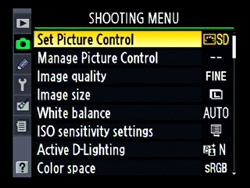
When you press the Menu button at the left panel on the back of your camera, you will get few menu options. Please click on the Shooting Menu (camera icon) where you will find ISO sensitivity settings option. When you go inside that option, there are mainly two things to be considered, one is ISO Sensitivity which is available with all exposure modes and another one is ISO Sensitivity Auto Control which is available in PAS modes only.

ISO Sensitivity option allows you to specify the ISO settings. It's a same thing as you press the ISO button on the back of your D90 and rotate main command dial. In Nikon D90, ISO can be set to AUTO which lets camera pick ISO value automatically as necessary or you can also manually set any value that ranges from LO 1 (equivalent to ISO 100) through 3200 to HI 1 (equivalent to ISO 6400). ISO Sensitivity Auto Control menu lets you specify how and when your camera will adjust the ISO value automatically under different lighting conditions. When Auto ISO is activated, the camera set ISO value whenever it's necessary if current ISO settings won't allow you for optimal exposure. There are three main features to be considered when you enable ISO sensitivity auto control option. Here is the brief discussion about them.

1.  ISO sensitivity auto Control ON/OFF

This button will let you set the ISO sensitivity auto control ON or OFF. If it's OFF, it will prevent the camera from changing the ISO value automatically. If you turn this feature off, you have to increase or decrease the ISO value manually to compensate the exposure.

2. Maximum Sensitivity

This option is used to set the highest ISO value your camera can set automatically before it starts lowering the shutter speed to get the proper exposure.

3. Minimum shutter speed

This setting allows you to set D90 how slow the shutter speed can be before ISO is boosted up by camera automatically to higher value to get proper exposure. Default value is 1/30th of the second and it's not recommended most of the time to set shutter speed below that unless you are using tripod. If you are using telephoto lens, you might want to set the Minimum shutter speed to 1/250th of the second and if you are using wide angle lens for landscape, you might want to set below 1/30th of the second.